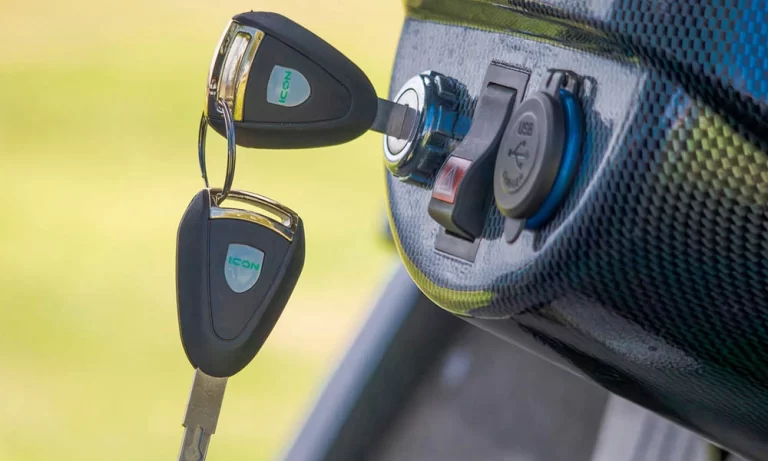
How to Install a USB Charger in a Golf Cart (48V & 12V Wiring Guide)
Most golf carts (including newer electric models) don’t come with a built-in USB charging port. If you want to charge your phone, GPS, or Bluetooth speaker while you ride, adding one is one of the easiest upgrades you can make.
This guide covers everything: the right parts for your cart’s voltage, step-by-step wiring, brand-specific notes for Club Car, EZGO, and Yamaha, and what to watch out for.
What You’ll Need
- USB charger port (make sure it matches your system voltage — see below)
- Voltage reducer/converter (required if your cart runs 36V or 48V and your charger is 12V)
- Inline fuse holder and appropriately rated fuse
- Wire connectors and crimping tool
- Wire stripper
- Drill with hole saw bit (sized to your charger port)
- Zip ties or wire clips
- Electrical tape or heat shrink tubing
- Multimeter (strongly recommended)
Step 1: Choose the Right USB Charger for Your Golf Cart
This is the step most people get wrong, and it’s the most important one.
Golf carts typically run on 36V or 48V battery systems. Standard USB chargers and most aftermarket USB ports are designed for 12V input. Connecting a 12V USB charger directly to a 48V system will destroy it immediately, and could be a fire hazard.
You have two options:
Option A — 48V-compatible USB charger: Some USB chargers are specifically designed for 48V golf cart systems. These handle the voltage conversion internally. Check the product specs carefully. It needs to explicitly state 48V input compatibility.
Option B — 12V USB charger + voltage reducer: A voltage reducer (also called a DC-DC converter) steps your cart’s 36V or 48V power down to 12V before it reaches the USB port. This gives you more flexibility in charger choice and is a reliable setup when wired correctly.
If you’re not sure what voltage your cart runs, check the battery compartment. Count the batteries and their individual voltage: six 8V batteries = 48V system; six 6V batteries = 36V system.
Step 2: Find Your Mounting Location
Pick a spot near the dash or steering column where the port will be easy to reach from the driver’s seat. Common locations include the center dash panel, the side of the glove box, or the dashboard face.
Before drilling, check what’s behind the panel — wiring, brackets, or structural supports can get in the way. Use a drill with an appropriately sized hole saw to make a clean cutout that fits your charger housing snugly.
Step 3: Wire the USB Charger
If You’re Using a 48V-Compatible USB Charger
Run wiring from your battery bank to the charger:
- Connect the positive wire (red) to the battery pack’s positive terminal
- Connect the negative wire (black) to the battery pack’s negative terminal
- Install an inline fuse holder on the positive wire before it reaches the charger — this is non-negotiable for safety
- Use the fuse amperage rating specified by your charger manufacturer (typically 5–10A for USB ports)
If You’re Using a Voltage Reducer + 12V Charger
- Wire the voltage reducer’s input to your battery pack (positive to positive, negative to negative, with an inline fuse on the positive lead)
- Wire the voltage reducer’s output to your USB charger port’s input terminals
- Double-check polarity at every connection — reversed polarity will damage the reducer and charger
In both setups, keep wire runs as short and direct as possible, and keep the wiring away from moving parts and heat sources.
Step 4: Secure the Wiring
Loose wiring is how small electrical problems become big ones. Once your connections are made:
- Use zip ties or wire clips to secure runs along the frame or under panels
- Protect all connections with heat shrink tubing (preferred over electrical tape — it’s more durable and moisture-resistant)
- Route wires away from any moving components, sharp edges, or areas that collect water
- Tuck excess wire behind panels where possible for a clean finish
Step 5: Test Before You Button Everything Up
Before reinstalling any panels, test the install:
- Turn the cart on
- Plug a device into the USB port
- Confirm it’s charging
If it’s not working, use a multimeter to check:
- Voltage at the battery terminals (confirms your source is live)
- Voltage at the reducer output (should read ~12V)
- Voltage at the USB charger input terminals
No voltage at the charger usually means a blown fuse, a wiring gap, or a loose connection. Recheck each joint before assuming the charger is defective.
Step 6: Finish the Install
Once everything tests correctly:
- Snap the USB port housing into your drilled cutout and secure it per the manufacturer’s instructions
- Install the weatherproof cap if your charger includes one — it keeps out dust, moisture, and debris when the port isn’t in use
- Reinstall any panels you removed
If you want a cleaner look, backlit USB ports are available and make the port easy to find at night without any additional wiring.
Brand-Specific Notes
Club Car USB port installation: Club Car’s IQ and Precedent models use a 48V system. Most installs use a voltage reducer wired to the main battery terminal. There’s typically good dash access behind the passenger-side panel for routing wiring cleanly.
EZGO USB port installation: EZGO RXV and TXT models are commonly 48V. The dash on these carts has limited depth, so measure your charger housing carefully before drilling. Wire access runs through the front cowl area.
Yamaha golf cart USB port installation: Yamaha Drive and Drive2 models are 48V. The steering column area typically offers the most accessible mounting location. Yamaha’s wiring harness is well-organized, which makes it easier to route new wiring neatly alongside existing runs.
Common Mistakes to Avoid
Skipping the fuse — An unfused power line to a USB charger is a wiring fire waiting to happen. Always install an inline fuse on the positive lead.
Wrong voltage charger — A 12V charger wired directly to a 48V system will fail immediately and may cause more damage. Confirm compatibility before connecting anything.
Poor connections — Twisted and taped wire connections corrode over time, especially in outdoor use. Use proper crimp connectors and heat shrink on every joint.
Mounting in a water-exposed location — Even “waterproof” USB ports have limits. Avoid mounting in locations that collect standing water or take direct rain exposure without additional protection.
Want It Installed for You?
If you’d rather skip the wiring and have it done right the first time, our service department at Central Valley Carts installs USB chargers, Bluetooth speakers, custom lighting, and other accessories on all major cart brands. We can usually handle accessory installs quickly alongside any scheduled service.
Looking to upgrade your cart further? We also carry a full range of golf cart accessories — from sound systems and lighting to seat covers and storage solutions.
👉 Contact us to schedule an install
Frequently Asked Questions
Yes — but you need either a 48V-compatible USB charger or a voltage reducer that steps the power down to 12V first. Never connect a standard 12V USB charger directly to a 48V system.
They’re the same thing in most cases — a panel-mount USB port that you wire into your cart’s electrical system. Some come with built-in voltage conversion; others require an external reducer.
Yes, unless your USB charger explicitly supports 36V input. Most standard USB chargers require 12V, so a reducer is needed for 36V and 48V systems alike.
Open the battery compartment and count the batteries and their individual voltage rating. Six 6V batteries = 36V. Six 8V batteries = 48V. Four 12V batteries = 48V.
It’s a DIY-friendly install for anyone comfortable with basic electrical work. If you’re unfamiliar with wiring or unsure about your voltage setup, having a technician do it is fast and inexpensive compared to replacing a damaged charger or wiring harness.
A USB charger draws very little current compared to the drive motor. In normal use it won’t meaningfully impact your range, but it’s good practice not to leave devices charging on a parked cart for extended periods.